
Many blogs grow one post at a time. Someone spots a keyword, writes an article, and moves on to the next one. A year later, there are ten posts that touch on the same subject, none of them link to each other, and two of them compete for the same search.
A topic cluster fixes this by planning around subjects instead of single keywords. You pick a core topic, cover each part of it on its own page, and link those pages together so readers and search engines can see the whole picture.
This guide covers where the idea came from, how to plan a cluster and a wider topical map, how to link the pages, and how to audit a cluster once it’s live.
What a topic cluster looks like
A topic cluster has two kinds of pages:
- A hub page (often called a pillar page), which covers the broad topic at a high level and links to every page in the cluster.
- Spoke pages (sometimes called supporting or cluster pages), which each go deep on one subtopic or question and link back to the hub.
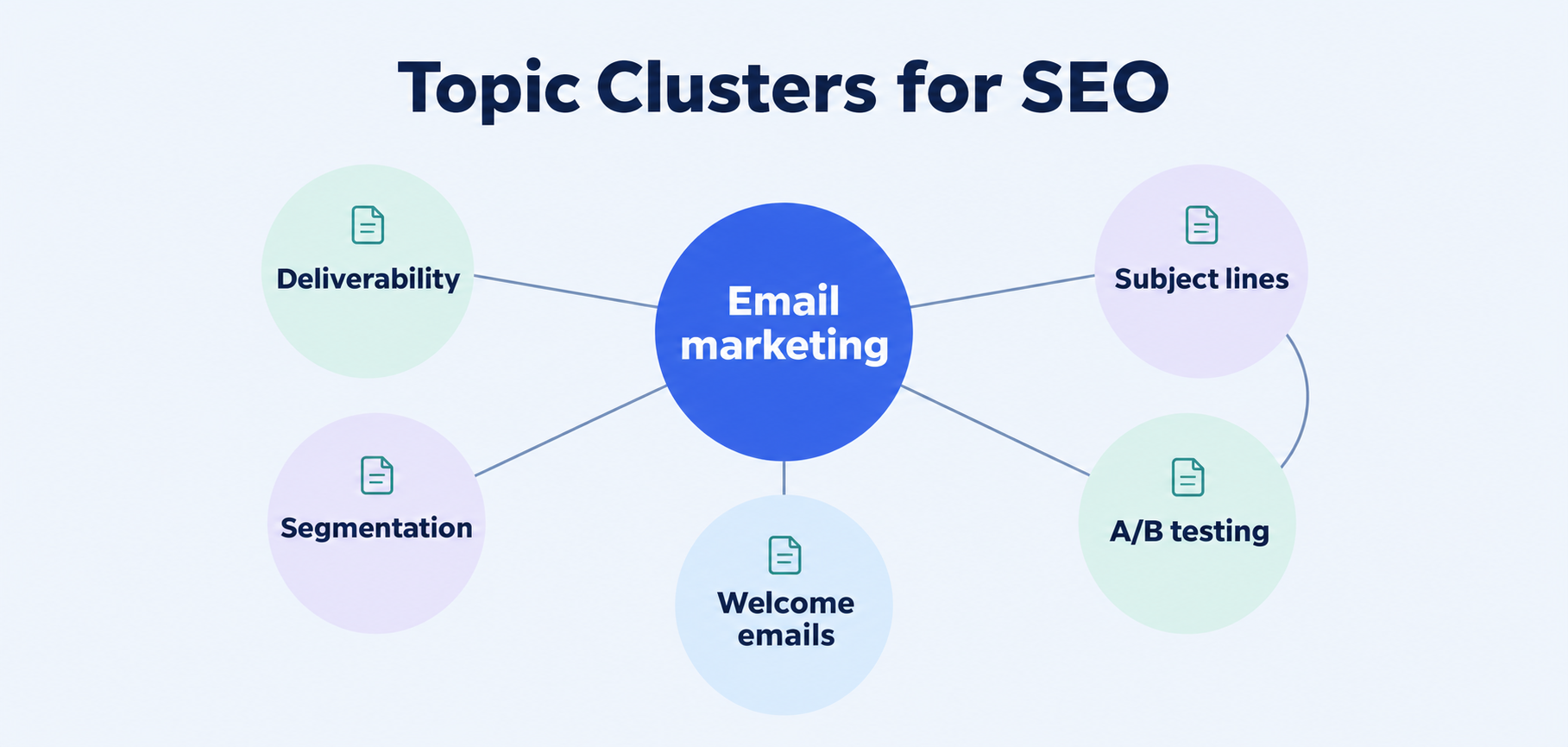
Say you run an email marketing tool. Your cluster might look like this:
| Page | Role | What it covers |
|---|---|---|
| Email marketing: a beginner’s guide | Hub | What email marketing is, how it works, and where to start |
| How to improve email deliverability | Spoke | Why emails land in spam, and how to fix it |
| How to write email subject lines | Spoke | Formulas, length, and testing |
| Email list segmentation | Spoke | Ways to split a list, with examples |
| Welcome email examples | Spoke | What to send new subscribers |
| How to A/B test emails | Spoke | What to test and how to read results |
The hub links to all five spoke pages. Each spoke links back to the hub, and to other spoke pages where it helps the reader. The subject lines page, for example, would naturally link to the A/B testing page.

Where the idea came from
HubSpot popularised the model. Two of its former team members, Anum Hussain and Cambria Davies, tested internal linking on HubSpot’s blog and published the research in 2015 as “Topics Over Keywords.” According to HubSpot’s guide to topic clusters, “the more internal links they added between related pages, the higher those pages climbed in SERPs.”
It’s worth being clear about what that does and doesn’t mean. As Ahrefs points out, “Google has never specifically said to use topic clusters.” Clusters are a way to organise content, and their value comes from what they encourage: useful pages, clear internal links, and coverage that answers a searcher’s next question.
Topic clusters vs topical maps
The two terms are often used interchangeably, but it helps to keep them separate:
- A topic cluster is a group of published pages around one topic, like the email marketing example above.
- A topical map is the plan behind your clusters. It lists every topic and subtopic you intend to cover, which page covers each one, and which pages don’t exist yet.
A small site might have one topical map with three or four clusters on it. The map is where you spot gaps and overlaps before you write anything.
Here’s part of a topical map for the same email marketing tool:
| Topic | Subtopic | Search intent | Page | Status |
|---|---|---|---|---|
| Email marketing | Email deliverability | How-to | /blog/email-deliverability/ | Live |
| Email marketing | Subject lines | How-to | /blog/email-subject-lines/ | Live |
| Email marketing | Email automation | How-to | None | Gap |
| Email marketing | Email marketing laws | Informational | /blog/gdpr-email/ and /blog/can-spam/ | Overlap: merge or split by country |
| Email design | Email templates | Commercial | /templates/ | Live |
A spreadsheet is enough. What matters is that every subtopic has exactly one page assigned to it.
How to plan a topic cluster
Step 1: Pick a core topic that fits what your site is for
Choose a topic broad enough to split into many subtopics, but narrow enough that you’re a credible source on it. For the email tool, “email marketing” works. “Digital marketing” is too broad, and “email subject lines” is too narrow to be the hub.
A good test is whether the people searching for the topic are the readers your site exists to reach. For a business, that means people who could become customers; for a publisher or personal blog, it might mean readers who’ll subscribe, come back, or share your work. If the answer is no, the cluster may bring traffic but little else.
Step 2: List the subtopics and questions people search for
Collect everything people want to know about the topic. Good places to look:
- Google’s “People also ask” and related searches for your core topic
- Your own Search Console data, filtered to queries that contain the topic
- A keyword tool, filtered to questions and longer phrases
- The sections of top-ranking pages, to see which subtopics they treat as essential
- The questions your audience already asks, from sales and support teams, or from blog comments and reader emails
If you want a more structured way to find related concepts, our guide to entity SEO covers how to find the related entities a topic should include.
Step 3: Group keywords that need the same page
Many keywords on your list will be different ways of asking the same thing. “Email deliverability,” “why are my emails going to spam,” and “improve inbox placement” probably belong on one page.
The quickest check is to search each keyword and compare the results. If two keywords bring up mostly the same top-ranking pages, that suggests Google sees them as the same need, so they belong on one page. If the results are different, they need separate pages.
This process is often called keyword clustering, and many keyword tools can do it in bulk.
Step 4: Map your existing pages before writing new ones
Before planning anything new, match the pages you already have against your list of subtopics. You’ll usually find three things:
- Pages that already cover a subtopic well. These go straight into the cluster.
- Two or more pages covering the same subtopic. Merge them, or give each a clearly different angle, so they don’t compete for the same searches.
- Subtopics with no page. These are your gaps.
In Search Console, open the Performance report, filter by a query, and switch to the Pages tab. If two of your pages both get impressions for the same query, check whether they’re competing.
Step 5: Plan the hub page
The hub page gives an overview of the topic and sends readers to the right spoke page. It doesn’t need to be a 10,000-word guide that repeats everything in the cluster.
A useful hub:
- Answers the broad question someone searching the core topic has
- Gives a short summary of each subtopic, with a link to the page that covers it in depth
- Is organised in the order a reader would move through the topic
If you already have a strong, broad page on the topic, it can become the hub. Add the links and summaries rather than starting from scratch.
Step 6: Turn the gaps into briefs, in priority order
You probably can’t write every missing page at once. Prioritise the gaps that:
- Answer the questions your readers or customers ask most
- Have real search demand
- Fill an obvious hole in the reader’s journey, such as a missing “how to” page between a beginner’s guide and a more advanced one
Each brief should say which hub the page belongs to and which pages it should link to, so the links get planned rather than added as an afterthought.
How to link a topic cluster
Links are what turn a set of related pages into a cluster. Without them, it’s much harder for Google and readers to see that the pages belong together.
- Hub to spokes: the hub links to every page in the cluster.
- Spokes to hub: every spoke page links back to the hub.
- Spoke to spoke: link between pages where a reader would naturally want to go next, not to every page in the cluster.
- New pages, both ways: when you publish a new spoke page, link to it from the hub and from older pages that mention its subject.
Use descriptive anchor text that tells readers what they’ll find. “Our guide to email deliverability” is clearer than “read more.” Our guide to internal linking for SEO covers anchor text and link placement in more detail.
Tip: Add a short “In this guide” section to your hub page that lists every spoke page. It gives readers a map of the topic and makes sure no page in the cluster is left without a link from the hub.
Do topic clusters matter for AI search?
Google’s AI Mode doesn’t answer a question by finding one page. Google’s Head of Search, Elizabeth Reid, has described how AI Mode uses “our query fan-out technique, breaking down your question into subtopics and issuing a multitude of queries simultaneously on your behalf,” in a Google blog post from May 2025.
So when someone asks a question, AI Mode searches for each part of it separately, not just the question as a whole. A cluster is one way to make sure each of those parts has a page on your site that answers it. Our guide to semantic SEO explains query fan-out and how it changes what a page needs to cover.
Is “topical authority” real?
You’ll often hear that clusters build “topical authority,” as if Google gives each site a score per topic. The evidence is mixed, so it’s worth knowing what’s confirmed and what isn’t.
- Google has a topic authority system, but it’s built for news queries. In 2023, Google described a system that “helps determine which expert sources are helpful to someone’s newsy query in certain specialized topic areas.”
- Leaked documents mention topic focus. Google’s internal API documents, leaked in 2024, include attributes called siteFocusScore and siteRadius. As Search Engine Land’s analysis puts it, “siteFocusScore denotes how much a site is focused on a specific topic,” but “we don’t know to what extent Google uses these scoring factors.”
- Google’s John Mueller says not to worry about it. When an SEO on Reddit argued that topical authority was just a new name for relevance, Mueller replied, “This,” and later added, “Don’t worry about it,” as Search Engine Journal reported.
The practical takeaway is the same either way. Cover a topic thoroughly, keep each page focused, and link the pages clearly, because that helps readers whether or not Google measures it as a score.
How to audit a topic cluster
A cluster isn’t finished when the last page goes live. Pages get renamed, links break, and new pages get published without being linked in. Check each cluster every few months for these problems:
Broken links between cluster pages
When a spoke page is moved or deleted, the links to it from the hub and other pages break. Readers hit a 404, and the cluster loses a connection.
The WebYes website audit flags broken links across your site, so you can find and fix them in one pass. If the page moved, update each link to point to its new URL rather than relying on a redirect. If it was deleted, remove the link or point it to the closest replacement.
Pages with no links from the cluster
New spoke pages are easy to publish and forget to link. Open your hub and check that it links to every page on your topical map marked “Live.” Then check that every spoke page links back.
A page with no internal links pointing to it at all is called an orphan page. Our internal linking guide shows how to find orphan pages across your site by comparing your sitemap with a crawl.
Two pages competing for the same search
Over time, a new post can end up covering the same subtopic as an older one. Use the Search Console check from Step 4 on your cluster’s main queries, and merge or refocus pages that overlap.
Outdated pages
Clusters only stay useful if each page stays accurate. Update spoke pages when tools, rules, or best practices change, and add the update to your topical map so the team knows what was checked and when.
New gaps
Search behaviour changes. Every few months, repeat Step 2 for your core topic and add any new subtopics to your topical map.
Common topic cluster mistakes
- Writing thin pages just to fill the map. A spoke page should exist because people have a distinct question, not because the cluster looks incomplete without it.
- Splitting one topic across several weak pages. If two subtopics have the same search intent, one strong page is usually more useful than two thin ones.
- A hub that’s only a list of links. The hub still needs to help someone who searched the broad topic.
- Linking everything to everything. Link where it helps the reader. A sidebar listing every page in the cluster on every page adds noise, not meaning.
- Treating the map as finished. A topical map is a working document, not a one-off plan.
FAQs on topic clusters
A topic cluster is a group of pages on one subject: a hub page that covers the topic broadly, and spoke pages that each go deep on one part of it. The pages link to each other so readers and search engines can see how they relate.
The pillar page, or hub, is one page in the cluster. The topic cluster is the whole group: the pillar page plus every spoke page linked to it.
There’s no set number. Ahrefs gives examples ranging from eight pages to more than 700. Cover each subtopic that has a distinct search need, and stop there.
Not that Google has said. Google hasn’t recommended topic clusters or described any ranking signal for them. Clusters help because they lead to well-organised, well-linked pages that cover what searchers need.
Keyword clustering groups keywords that need the same page. A topical map is the bigger plan: every topic and subtopic you want to cover, and which page covers each one. You use keyword clustering while building the map.
AUTHOR

Safwana writes about web accessibility and the changing shape of SEO, from WCAG compliance and inclusive design to what it means to build a site that both humans and AI agents can actually navigate and understand. Her work sits at the point where these two worlds meet: making the web more usable for people, and more legible to the AI systems now reading it.
 Melwyn Joseph


