
Someone asks whether your website is AODA (Accessibility for Ontarians with Disabilities Act) compliant. You go looking for the answer and find plenty of rules, but not whether those rules are yours. What you owe depends on two things: the kind of organization you are, and how many people you employ in Ontario.
The two rules people ask about most, the website standard and the compliance report, use different employee thresholds. So the answer can be yes for one and no for the other. Guess wrong in either direction, and you either buy work you do not owe or miss a deadline that passed in 2021.
This article works out what applies to your organization, taken from the regulation itself. You will find the two questions that decide your obligations, what each type and size of organization owes, which requirements cover your website, both reporting deadlines, what to fix first, and what enforcement looks like in practice.
What AODA compliance means
AODA compliance means meeting the accessibility requirements that apply to your organization under the Accessibility for Ontarians with Disabilities Act and its regulation.
Ontario passed the Act in 2005. Most of the working rules now sit in one regulation, called the Integrated Accessibility Standards Regulation, or O. Reg. 191/11. It covers five areas: customer service, information and communications, employment, transportation, and the design of public spaces.
Not every requirement applies to every organization. The regulation sorts organizations into categories, then writes each rule against the categories it binds. That sorting step is what decides your workload.
Who the AODA applies to
The AODA applies to your organization if you have at least one employee in Ontario and you provide goods, services, or facilities to the public or to other organizations (s. 1(3)). If you have no employees in Ontario, you are outside it.
The regulation calls everyone it covers an obligated organization. That term means the Government of Ontario, the Legislative Assembly, a designated public sector organization, a large organization, or a small organization. The category you land in is what every requirement below keys off.
After that, two questions decide everything:
- What kind of organization are you?
- How many employees do you have in Ontario?
The regulation gives each combination a name, and then writes its rules against those names.
| Your organization | What the regulation calls you |
|---|---|
| Private business or non-profit, 1 to 49 employees in Ontario | Small organization (s. 2) |
| Private business or non-profit, 50 or more employees in Ontario | Large organization (s. 2) |
| A municipality, or a body listed in Schedule 1 of O. Reg. 191/11 or Table 1 of O. Reg. 146/10 | Designated public sector organization (s. 2) |
| An Ontario ministry or the Office of the Premier | Government of Ontario (s. 2) |
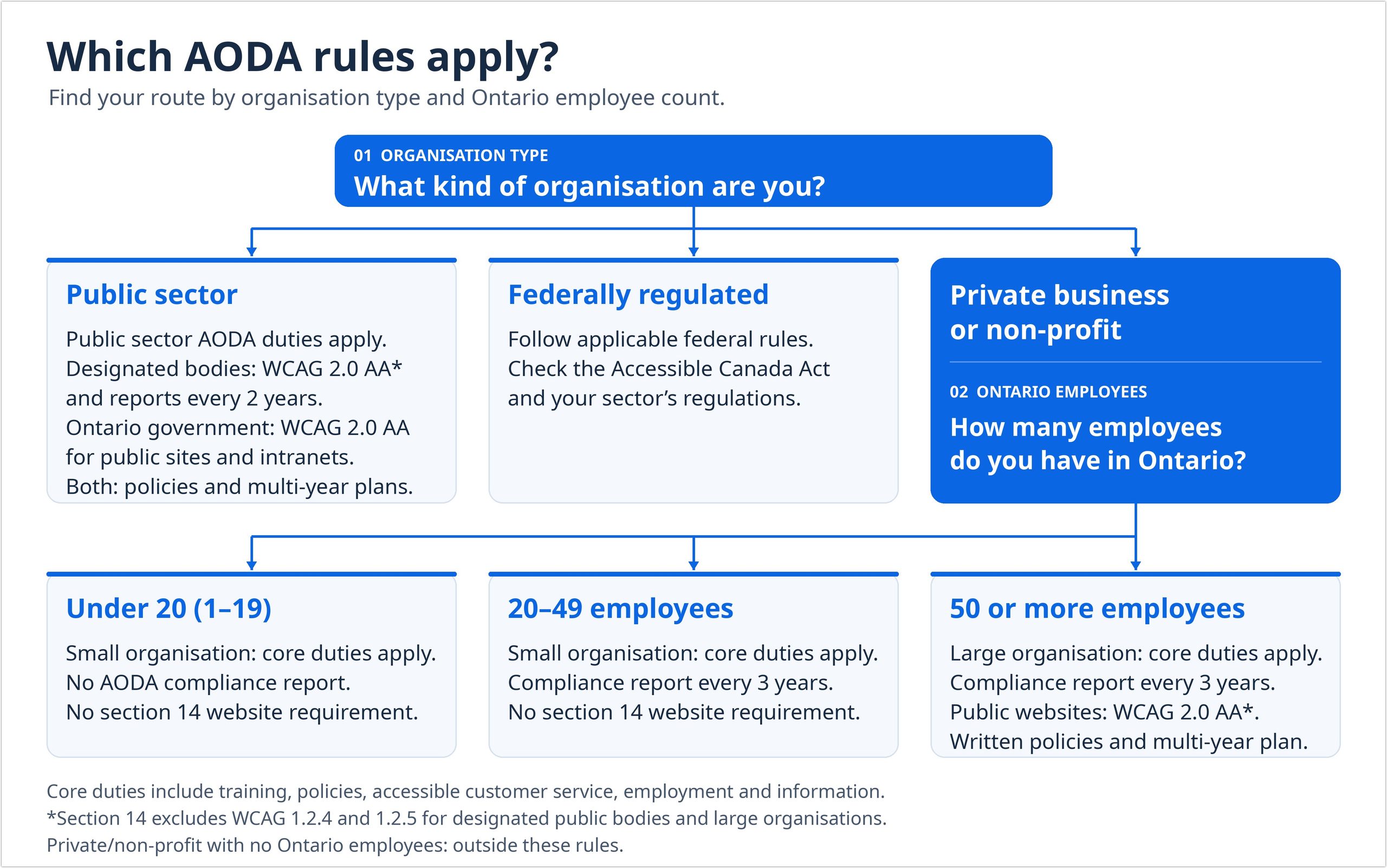
Two different thresholds then do the work, and they are not the same number. Twenty employees triggers the compliance report. Fifty employees triggers the website standard, the multi-year plan, and the training records.
How to count your employees
Count all full-time, part-time, seasonal, and contract workers, according to Ontario’s guidance for businesses and non-profits.
Do not count employees outside Ontario, volunteers, or independent contractors.
The line between a contract worker and an independent contractor matters here, because one counts and the other does not. Ontario describes an employee as someone you pay wages or a salary, whose work you assign, and whose details you have a right to control. If a worker does not meet that description, they are likely an independent contractor for counting purposes.
Leaving volunteers and independent contractors out of the count does not take them out of scope. Ontario is explicit that you remain responsible for the services they provide on your behalf, and you may need to train them.
If you have fewer than 20 employees
You are a small organization. You must:
- Create accessibility policies. You are not required to write them down, though Ontario recommends it (s. 3(1))
- Train every employee and volunteer on the Human Rights Code, accessible customer service, and any requirements that touch their job (s. 7(1))
- Provide accessible customer service, which includes welcoming service animals and support persons, allowing assistive devices, and giving notice of temporary disruptions (Part IV.2)
- Provide accessible formats and communication supports on request, at no extra cost, and tell the public that you do (s. 12)
- Make your feedback process accessible on request (s. 11)
- Provide emergency and public safety information in an accessible format on request, if you publish any (s. 13)
- Accommodate employees with disabilities through recruitment, employment and emergency response (Part III, in force for small organizations since 1 January 2017)
- Have regard to accessibility when designing or buying self-service kiosks (s. 6(2))
You do not have to file a compliance report, meet WCAG on your website, keep training records, or produce a multi-year accessibility plan.
The list above follows Ontario’s published guidance for businesses and non-profits, which groups the regulation’s requirements by organization size. The section numbers point to the regulation itself.
If you have 20 to 49 employees
Everything in the previous section applies, plus one thing: you must file an accessibility compliance report every three years. The current deadline is 31 December 2026.
You are still a small organization under the regulation. The 20-employee threshold comes from the reporting duty, not from the size categories, which is why the website standard still does not apply to you.
If you have 50 or more employees
You are a large organization. Everything above applies, and five more requirements switch on:
- Your public website and its content must meet WCAG 2.0 Level AA (s. 14(2)), covered in detail below
- You must write your accessibility policies down, make them publicly available, and provide them in an accessible format on request (s. 3(3))
- Your policies must include a statement of organizational commitment (s. 3(2))
- You must create, maintain, and post a multi-year accessibility plan, and review it at least every five years (s. 4(1))
- You must keep training records, including dates and the number of people trained (s. 7(5))
You file a compliance report every three years, on the same 31 December 2026 deadline.
If you are a designated public sector organization
You carry the largest set. Alongside everything above, you must consult people with disabilities when you build and update your accessibility plan, publish an annual status report (s. 4(2) and 4(3)), build accessibility into what you buy (s. 5), and incorporate accessibility features into self-service kiosks, where everyone else only has to have regard to accessibility (s. 6(1)).
Your reporting cycle is different too. Designated public sector organizations file every two years, not every three.
If you are federally regulated
Banks, airlines, telecommunications companies and interprovincial transport are federally regulated. The Accessible Canada Act covers any business that operates within the legislative authority of Parliament (ACA s. 7(1)(e)), and Ontario’s reporting portal treats “federally regulated” as a status change that takes you off the filing list.
If you are not certain which side of that line you sit on, this is the question worth putting to a lawyer rather than resolving from a web page.
The five AODA standards and what each asks of you
The five standards cover different parts of how an organization operates. A set of general requirements in Part I of the regulation sits on top of all of them.
| Standard | What it asks of you | Who it binds |
|---|---|---|
| Customer service (Part IV.2) | Serve customers with disabilities, welcome service animals and support persons, allow assistive devices, give notice of disruptions, take accessible feedback | Every obligated organization that provides goods, services or facilities (s. 80.45) |
| Information and communications (Part II) | Provide accessible formats and communication supports on request, make feedback and emergency information accessible, meet WCAG on websites | Every obligated organization, with the website rule limited by size (ss. 11 to 14) |
| Employment (Part III) | Accessible recruitment, accommodation during employment, individual emergency response plans, return to work | Every obligated organization that is an employer (s. 20) |
| Transportation (Part IV) | Rules for conventional and specialized transit, taxis, school transport and certain other providers | Public sector transportation organizations, plus specific duties for school boards (s. 75) and municipalities. Most private businesses sit outside this Part |
| Design of public spaces (Part IV.1) | Accessible paths, parking, service counters, waiting areas and recreational spaces | Every obligated organization, but only for public spaces it newly constructs or redevelops (s. 80.2) |
The general requirements in Part I are the ones small organizations most often miss, because they are not attached to any single standard. They are accessibility policies (s. 3), the multi-year plan (s. 4), accessible procurement (s. 5), self-service kiosks (s. 6), and training (s. 7).
AODA website requirements: which ones apply to you
The WCAG requirement binds designated public sector organizations and large organizations. Section 14(2) names those two categories and no others, so a private business with fewer than 50 employees in Ontario has no obligation to make its website meet WCAG.
For the organizations it does bind, here is what it requires.
The standard is WCAG 2.0 Level AA. Not 2.1, and not the WCAG 2.2 checklist you may have been working from. The regulation names the version directly, and it says “shall”, so it is a requirement rather than a recommendation (s. 14(2)).
Two success criteria are carved out. The 1 January 2021 deadline excludes 1.2.4 Captions (Live) and 1.2.5 Audio Descriptions (Pre-recorded), so live captioning and pre-recorded audio description are not part of what large organizations must meet (s. 14(4)2).
It covers content published after 1 January 2012. Web content published on your site before that date is outside the requirement (s. 14(5)(b)).
It covers sites you can actually change. The requirement reaches websites and web content, including web applications, that you control directly or through a contract that allows you to modify the product (s. 14(5)(a)).
There is a practicability limit. Section 14(5) opens with “Except where meeting the requirement is not practicable”. Section 14(6) says that in deciding this, you may consider whether commercial software or tools are available, and whether there would be a significant impact on an implementation timeline planned or started before 1 January 2012. This is a narrow exception, not a general escape, and you should expect to be able to explain your reasoning.
The Government of Ontario and the Legislative Assembly carry a stricter version. Their obligation covers intranet sites as well as public ones, and since 1 January 2020 they have had to meet full WCAG 2.0 Level AA with no carve-outs at all (s. 14(1) and s. 14(3)3).
If you have fewer than 50 employees, your website is still not exempt from everything
The WCAG requirement does not apply to you. The accessible formats requirement does.
Section 12 binds every obligated organization. On request, you must provide information in an accessible format or with communication supports, in a timely way, and at no more than the regular price. You also have to tell the public that you will do this.
Ontario’s guidance states that this covers “other public information, such as menus, order forms and information provided to the public in print, on websites or handheld devices”. So the content on your site is in scope on request, even though the technical standard is not. A note on your website saying accessible formats are available, and a real process behind it, is the minimum here.
AODA compliance deadlines
There are two kinds of AODA deadline, and they work differently. One kind was a date your obligations switched on, and those have all passed. The other kind repeats on a cycle, and is the only kind still ahead of you.
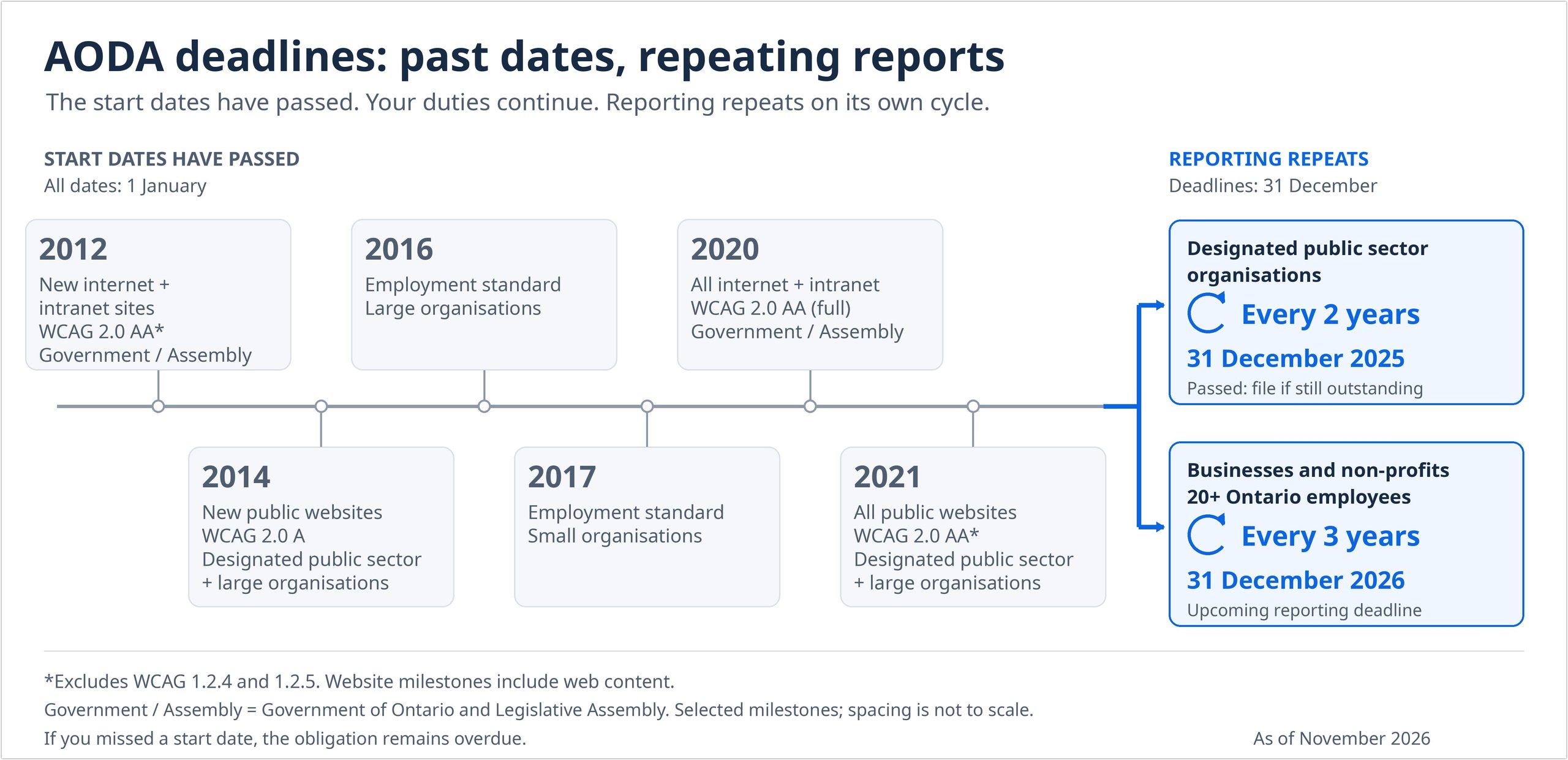
Deadlines that have already passed
| Requirement | Who | Deadline |
|---|---|---|
| New websites and content, WCAG 2.0 Level A | Designated public sector and large organizations | 1 January 2014 (s. 14(4)1) |
| All public websites and content, WCAG 2.0 Level AA, excluding 1.2.4 and 1.2.5 | Designated public sector and large organizations | 1 January 2021 (s. 14(4)2) |
| Employment standard | Large organizations | 1 January 2016 (s. 21) |
| Employment standard | Small organizations | 1 January 2017 (s. 21) |
| All internet and intranet sites, full WCAG 2.0 Level AA | Government of Ontario and Legislative Assembly | 1 January 2020 (s. 14(3)3) |
If one of these passed without you meeting it, the obligation did not expire. It is simply overdue.
Deadlines that repeat
| Who | Cycle | Current deadline |
|---|---|---|
| Businesses and non-profits with 20 or more employees | Every three years | 31 December 2026 |
| Designated public sector organizations | Every two years | 31 December 2025 |
The two-year public sector cycle is easy to miss, because most summaries describe only the three-year business cycle.
If you missed a reporting deadline
File anyway. Ontario states directly that designated public sector organizations still need to file the 2025 report even though the deadline has passed.
Filing late is a better position than not filing. The report is a legal obligation under the Act, and the government’s stated enforcement approach starts from whether organizations are filing at all.
The accessibility compliance report
The accessibility compliance report is a form you submit to confirm that your organization has met the accessibility requirements that currently apply to it.
You must file if you are a business or non-profit with a website and 20 or more employees, or a designated public sector organization.
Before you start, you need four things: your organization’s legal name, your business number (the BN9 from your federal or provincial tax return), your number of employees, and the name and contact details of your certifier. The certifier has to be a senior officer with legal authority to state that the report is complete and accurate, which comes from section 15 of the Act.
To file, open the Accessibility Compliance Reporting Portal, create or sign into an account, choose “New Submission”, select “Accessibility Compliance Report”, and submit. Ontario’s page on completing your accessibility compliance report includes a step-by-step user guide for the portal.
You can file for up to 20 organizations at once, but only if they share the same organization category, employee count range, certifier, and answers to every question. Any difference means a separate form.
After you submit, a confirmation email with a confirmation number goes to the certifier and the primary contact.
You also have to keep your profile current. Tell the ministry if your address, primary contact, employee count, or status changes, including if you drop below 20 employees, close, or become federally regulated. Organizations under 20 employees do not file a report, but they do still maintain their profile in the portal.
Your AODA compliance checklist: what to fix first
Start with the requirements that bind every organization regardless of size, because those are the ones you certainly owe. If you would rather work from a full accessibility audit than a priority order, that is the other way in.
- Write a note offering accessible formats, and build a real process behind it. This satisfies sections 11 and 12, takes an afternoon, and is the single most commonly missed requirement for small organizations.
- Train your staff and volunteers. Ontario publishes free training modules through AccessForward, so this costs time but no money (s. 7).
- Create your accessibility policies. Ontario publishes a sample accessibility policy you can start from. Small organizations do not have to document them, but doing so means you are ready if you grow past 50 employees (s. 3).
- Check your customer service practices, particularly service animals, support persons, assistive devices, and disruption notices (Part IV.2).
- Review your recruitment and employment process for accommodation, from the job posting through to individual emergency response plans (Part III).
- File your compliance report if you have 20 or more employees.
- Then, if you have 50 or more employees, work on the website. Our guide to how to check WCAG compliance covers the order to work in: scan for the mechanical failures, fix those, then test with a keyboard and a screen reader for what scanning cannot detect. Add your multi-year accessibility plan and training records at the same time, since both switch on at the same threshold.
Taking them in this order means the cheapest obligations, which apply to everyone, are done before you spend money on the expensive one that may not apply to you at all.
AODA penalties and what enforcement actually looks like
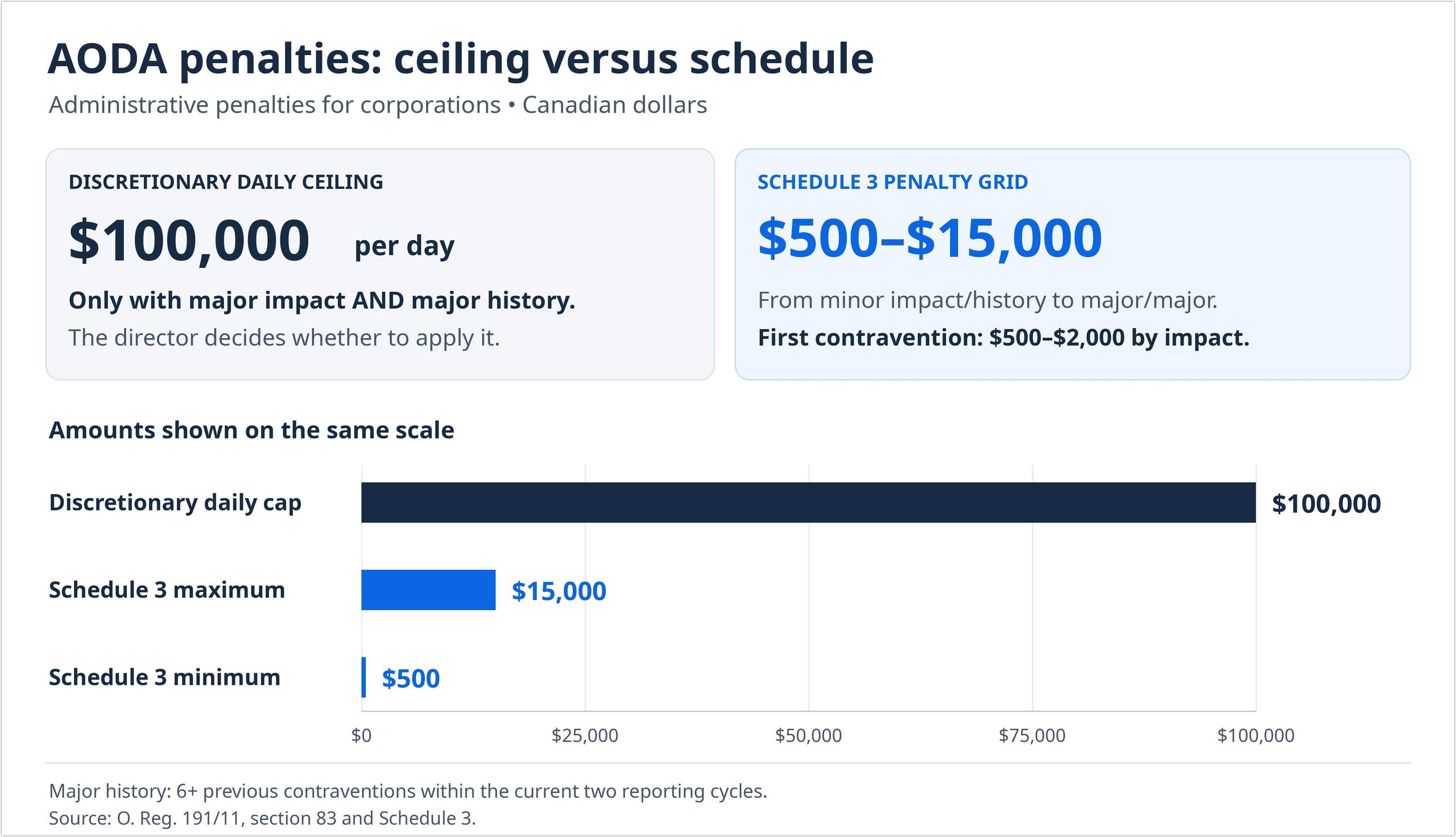
Penalties under the AODA are administrative penalties set by a schedule, not open-ended fines. The amount depends on two judgments a director makes: how severe the contravention was, and how many previous contraventions your organization has.
Severity is ranked minor, moderate, or major. A minor contravention involves an administrative requirement. A moderate one involves organizational preparedness. A major one involves a priority requirement, including anything that may pose a health or safety risk to people with disabilities (s. 83(2)).
History is ranked the same way. Minor means no more than one previous contravention in the current two reporting cycles. Moderate means two to five. Major means six or more (s. 83(3)).
Those two rankings meet in a grid. For corporations, Schedule 3 sets the amounts:
| Contravention history | Major impact | Moderate impact | Minor impact |
|---|---|---|---|
| Major | $15,000 | $10,000 | $5,000 |
| Moderate | $10,000 | $5,000 | $2,500 |
| Minor | $2,000 | $1,000 | $500 |
For individuals and unincorporated organizations, Schedule 2 sets lower amounts, from $200 up to $2,000.
You may have seen figures of $100,000 and $50,000 a day. Those come from section 83(1)5, and they are a ceiling rather than a standard penalty. A director may treat the Schedule amount as a daily penalty, capped at $100,000 for a corporation and $50,000 for an individual or unincorporated organization, but only where the impact of the contravention is major, and the contravention history is major. A major history means six or more previous contraventions. A first contravention by a corporation starts at $500.
Ontario describes its enforcement approach in three parts: collecting compliance reports, auditing and inspecting organizations to check they are following the requirements, and enforcing where appropriate. The example it gives of when enforcement is appropriate is organizations that avoid meeting their legal obligations.
The practical reading is that filing your report and having a genuine basis for what you certified matters more than the size of any single number.
Where the AODA stands in 2026
The Act set a goal of a fully accessible Ontario by 2025. That date has now passed, and two of the standards that would be needed to reach it are still being written.
Ontario has appointed four reviewers to assess how well the Act is working: Charles Beer in 2010, Mayo Moran in 2015, David C. Onley in 2019, and Rich Donovan in 2023. Standards development committees are currently working on proposed health care and education standards, with education split into kindergarten to Grade 12 and postsecondary.
The province’s current framework is called Advancing Accessibility in Ontario. The existing five standards remain in force unchanged, so none of this alters what you owe today.
What it does mean is that the rules are still moving. A health care or education standard, if adopted, would add requirements for organizations in those sectors.
Checking your own site against the standard
Start with Ontario’s own Accessibility Standards Checklist, a free interactive self-assessment that works out which AODA requirements apply to your organization. It is a PDF on the Ontario Forms Repository, and Ontario notes that you need to download it and open it in Adobe Reader, not in your browser.
For the website itself, if you are a large organization or in the designated public sector, you are testing against WCAG 2.0 Level AA, minus 1.2.4 and 1.2.5. The mechanics are the same as any other WCAG compliance check, only against an older version than most guidance assumes.
An automated scan is the right first step. It will find missing alternative text, insufficient color contrast, missing form labels, empty links, and incorrect heading structure quickly across every page. WebYes accessibility checker gives you that pass with the specific failures listed per page.
Automated testing cannot finish the job, and no tool can. A person has to judge whether alternative text actually describes the image. The same goes for whether your focus order makes sense, whether an error message tells someone what to do next, and whether a custom component works with a screen reader. Plan on a keyboard-only pass and screen reader testing over your main user journeys after the automated fixes are in.
FAQs on AODA compliance
Customer service, information and communications, employment, transportation, and design of public spaces. All five sit in the Integrated Accessibility Standards Regulation, O. Reg. 191/11, alongside a set of general requirements covering policies, planning, procurement, kiosks and training.
It means meeting the accessibility requirements that apply to your organization under the AODA and O. Reg. 191/11. Which requirements those are depends on what kind of organization you are and how many employees you have in Ontario.
Every organization with at least one Ontario employee must have accessibility policies, train staff, provide accessible customer service, and provide accessible formats on request. Organizations with 20 or more employees also file a compliance report. Organizations with 50 or more also meet WCAG 2.0 Level AA on their website, document their policies, publish a multi-year accessibility plan, and keep training records.
If you have at least one employee in Ontario and provide goods, services, or facilities, yes. The test is employees in Ontario, not where your head office sits. Employees outside Ontario do not count toward your thresholds.
No. You do still need to keep your organization’s profile up to date in the Accessibility Compliance Reporting Portal, including your address, primary contact, employee count, and status.
AUTHOR

Melwyn holds a Bachelor's degree in Computer Science and has been writing professionally for over 4 years. He has a strong background in SEO and is certified in web accessibility from the World Wide Web Consortium (W3C). When he's not writing about website optimisation, you can find him enjoying a game of FIFA or exploring the open world of GTA.
 Melwyn Joseph


